

Over Deurmatten
Aangeboden door
Over dit ontwerp
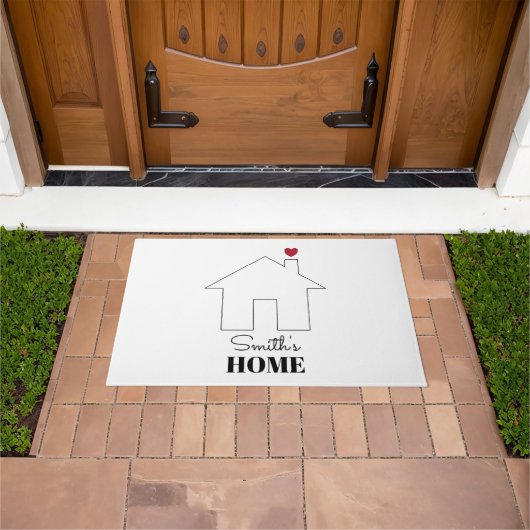
Smith's Home with Heart Deurmat
Deurmat met daarop een tekening van een huis met een hart boven de schoorsteen en "Smith's HOME" onder het huis. Alle eigenschappen van de ontwerpcomponenten (bijv. de vul- en randkleur, grootte en oriëntatie) kunnen worden aangepast. Om eenvoudigweg "Smith's" en HOME te wijzigen, kiest u "Personaliseer dit ontwerp" en brengt u uw wijzigingen aan. Om meer wijzigingen aan te brengen, volgt u de onderstaande stappen:
1. Ga naar het gedeelte "Bewerken met ontwerpprogramma's".
2. Om de kleur van een ontwerpcomponent te wijzigen, selecteert u deze in de lijst met lagen aan de linkerkant en kiest u de gewenste kleur op het kleurvak aan de rechterkant.
3. Om de tekst en/of het lettertype te wijzigen, selecteert u deze en selecteert u Tekst bewerken aan de rechterkant en wijzigt u indien nodig.
4. Om het ontwerp te vergroten of verkleinen, selecteert u alle componenten (Ctrl-A op Windows of Command-A op Mac) en gebruikt u de optie Schalen in het ontwerpprogramma aan de rechterkant om het ontwerp te vergroten of verkleinen.
5. Om het ontwerp te verplaatsen, selecteert u alle componenten en sleept u deze indien nodig.
6. Om een ontwerpcomponent te verplaatsen, selecteert u deze en sleept u deze indien nodig.
7. Om een component te verwijderen, selecteert u deze en drukt u op de toets Verwijderen op het toetsenbord. Om deze onzichtbaar te maken, kiest u het oogpictogram op de laag.
8. Om een achtergrondkleur toe te voegen, kiest u "Bkground" aan de linkerkant en selecteert u de gewenste kleur.
Ontwerp van international designer
Klant beoordelingen
Er zijn nog geen reviews voor dit product.Heb je dit product gekocht?
Tags
Andere Info
Product ID: 256844062434452730
Ontworpen op: 6-11-2025 14:46
Rating: G